Top Tip: Most confusion around Elementor comes from unclear expectations. It works best when understood as a visual building layer and feature enhancer within WordPress, not as a replacement for WordPress itself.
If you’re exploring Elementor for a new site or deciding whether an upgrade is worth it, having this context first could save you time later. You can also explore Elementor directly on the official site to see how the editor works in practice.
🎯 Who This Guide Is For: This guide is intended for WordPress users who want a clear, practical understanding of what Elementor actually does and where it fits within the WordPress ecosystem. It is especially useful for site owners, developers, and teams evaluating Elementor for content-heavy, marketing, or business-focused websites, or for those already using Elementor and reassessing its role as their site grows.
⏸ Who This Guide May Not Be Ideal For: This guide may be less relevant for users looking for a step-by-step tutorial, a feature-by-feature walkthrough, or a recommendation for or against Elementor. It also may not suit projects that are intentionally moving away from standard WordPress workflows or do not involve visual layout and presentation as part of their decision-making.
What Elementor Actually Is
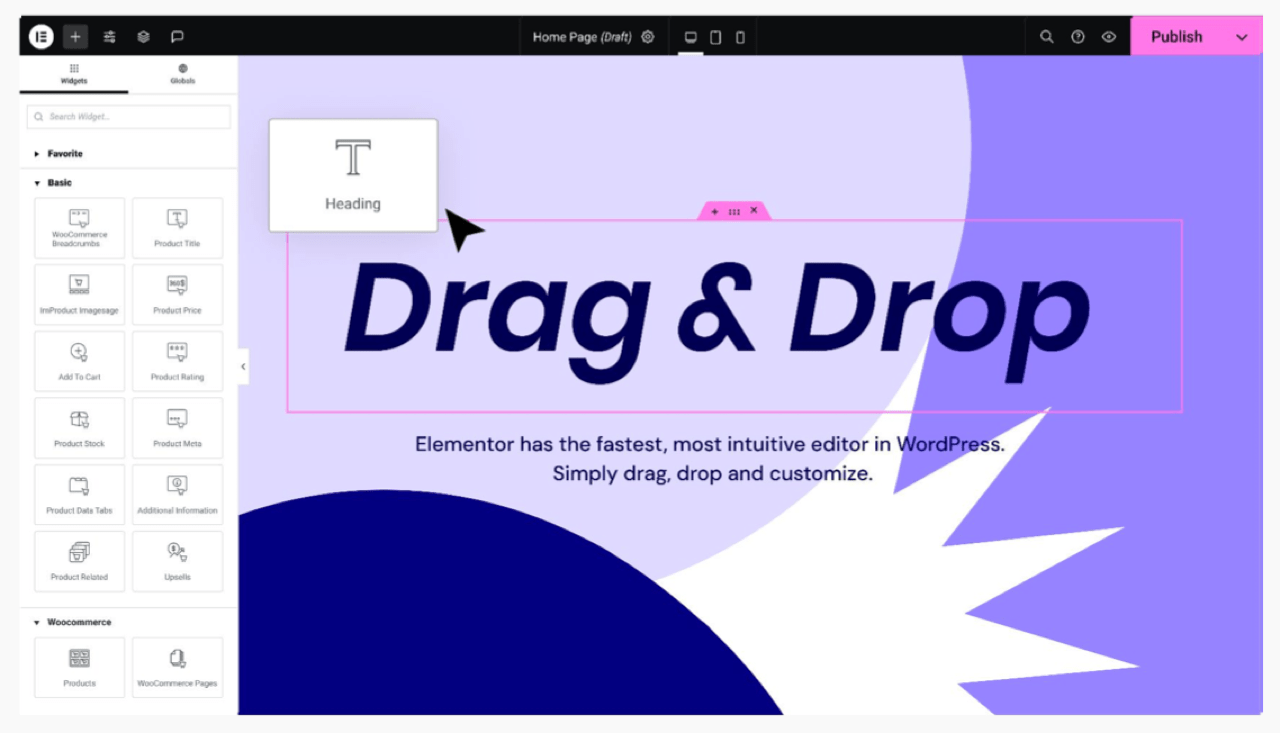
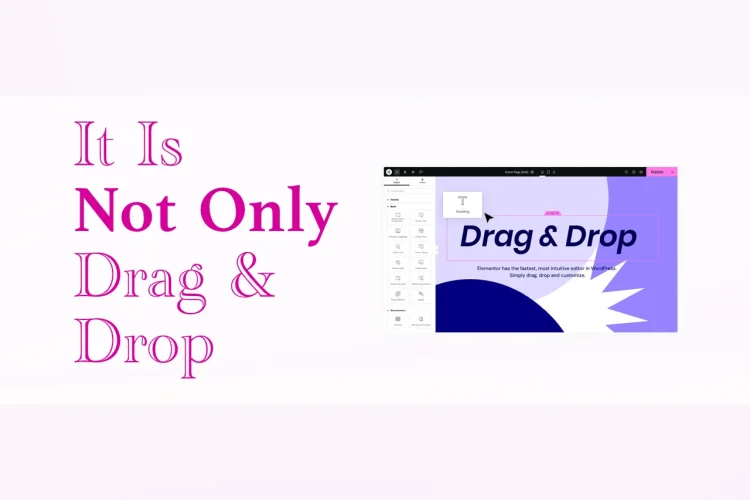
So, what is Elementor? At its core, Elementor is a visual website builder plugin for WordPress. It allows users to configure certain site settings, render content, and design pages and layouts using a front-end, real-time editor, rather than working solely inside the default WordPress editor. Changes are visible as they’re made, which is why Elementor is commonly described as a visual or drag-and-drop builder.
Elementor does not replace WordPress. It runs on top of it. WordPress still manages your content, users, and site settings, while Elementor focuses on how that content is laid out and styled on the front end. This separation is important to understand, especially for new users.
Because Elementor is a plugin, it can be added to an existing WordPress site or used from the beginning of a new build. Many users start with the free version to learn how the editor works, then decide later whether the additional capabilities of Elementor Pro are useful for their specific site.
Top Tip: Elementor works best when you treat it as a design layer. WordPress remains responsible for content and structure, while Elementor controls presentation and layout.
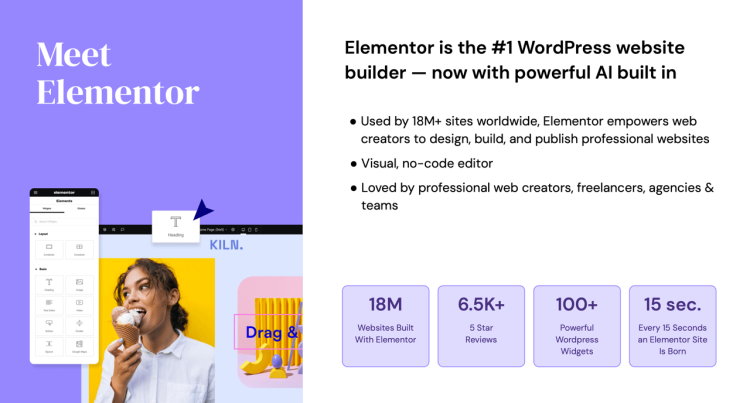
Alongside the page builder itself, Elementor also offers other products and services that sit outside the editor, such as AI-assisted tools and managed hosting. These are optional and separate from the core page-building experience. Throughout this article, the focus remains on Elementor as a WordPress page builder, rather than the wider set of products that can be added around it.
Elementor at a glance
| Aspect | Details |
|---|---|
| Plugin type | Visual website builder plugin for WordPress |
| Editing approach | Front-end, real-time visual editing |
| Requires WordPress | Yes |
| Theme compatibility | Works with most modern WordPress themes |
| Free edition | Elementor (Free) |
| Premium edition | Elementor Pro |
| Optional Elementor products | Additional, separate services such as Elementor AI or managed hosting, offered independently and not required for using the page builder |
What Elementor Is Not
Elementor is often misunderstood because it overlaps visually with several parts of WordPress. That overlap can make it seem like Elementor replaces things it actually depends on. Clarifying what Elementor is not helps set realistic expectations and avoids frustration later.
First, Elementor is not a WordPress theme. You still need a theme to control global styles, templates, and overall site structure. Elementor works with your theme, not instead of it. Some themes are designed to work especially well with Elementor, but the theme layer still matters.
Elementor is also not a content management system. WordPress remains responsible for posts, pages, users, media, and settings. Elementor does not change how WordPress stores or manages content. It only changes how that content is visually displayed on the front end.
Finally, Elementor page builder is not a complete website solution on its own. By default, the page builder does not provide hosting, security, backups, or performance optimization. Those responsibilities still sit elsewhere in your WordPress setup.
Top Tip: If you expect Elementor to replace your theme, hosting, or WordPress itself, it will feel limiting. When you treat it as one part of a larger setup, it tends to make much more sense.
Understanding these boundaries makes it easier to decide whether Elementor fits your workflow. It also helps explain why some users love it, while others struggle with it.
How Elementor Fits into WordPress
To understand Elementor properly, it helps to look at how it fits into a standard WordPress setup. Elementor does not sit above WordPress or outside it. It operates inside WordPress as a plugin and works alongside core features, themes, and other plugins.
WordPress remains responsible for managing content, users, and site-wide settings. When you create a page or post, that content still exists in WordPress as usual. Elementor simply provides an alternative way to design how that content appears on the front end, using a visual editor instead of the default block editor alone.
This layered approach is why Elementor can feel powerful but also confusing at first. Your theme controls global styling and structure, WordPress controls data and content, and Elementor focuses on layout, spacing, and visual presentation. Each part has a dedicated role to play.
Because Elementor follows WordPress standards, it generally works well with other plugins. Forms, SEO plugins, and eCommerce tools usually integrate without issue, as long as they are built according to WordPress best practices.
Top Tip: If something feels “off” when using Elementor, it’s often worth checking whether the issue belongs to WordPress, your theme, or another plugin. Elementor is rarely the only moving part.
Seeing Elementor as part of a system rather than a standalone tool makes it easier to troubleshoot issues and plan your site long term. This context also helps when deciding whether Elementor Free is enough or if Elementor Pro adds value for your setup.
Elementor Free vs Elementor Pro: Why Many Users Eventually Upgrade
Most people don’t start with Elementor Pro. They start with Elementor Free, build a few pages, and learn how the visual editor works. At that stage, Elementor already feels more flexible than the default WordPress experience, especially for layout and design.
As a site evolves, however, the way Elementor is used often changes. What begins as page-by-page design gradually turns into a need for consistency. Headers repeat. Footers need global updates. Layout patterns emerge. This is usually where users begin to reassess what Elementor Free can realistically support long term.
Elementor Pro does not introduce a completely new way of working. The editor stays the same. Instead, Pro expands Elementor’s scope. It allows design decisions to move beyond individual pages and into reusable templates and site-wide elements. For many users, this shift matters more than any single feature.
Rather than relying on multiple plugins or manual workarounds, Elementor Pro centralises more of the site-building process. This can simplify workflows over time, especially on sites where design consistency and scalability start to matter.
Top Tip: Elementor Pro usually becomes relevant when you stop thinking in pages and start thinking in systems. Repetition, global changes, and layout consistency are often the real triggers for upgrading.
How Elementor Free and Pro differ in practice
| Area | Elementor Free | Elementor Pro |
|---|---|---|
| Page design | Strong visual editor for individual pages | Same editor, with advanced design options |
| Site-wide elements | Handled mostly by the theme | Global design options through theme builder |
| Design consistency | Manual repetition across pages | Centralised and reusable layouts |
| Workflow complexity | Can increase as the site grows | Often reduced by consolidating tools |
| Long-term scalability | Best suited for simpler sites | More flexible as requirements expand |
Explore Elementor Pro on the official website
This difference in scope explains why Elementor Pro is often described as recommended rather than required. Many sites can run perfectly well on Elementor Free. Others reach a point where maintaining structure and consistency becomes harder without additional tools.
For users already invested in Elementor, upgrading to Pro is usually less about unlocking features and more about reducing friction. The learning curve is minimal, whereas the range of problems Elementor Pro can solve increases.
It’s also worth noting that Elementor Pro does not change WordPress itself. Content management, plugins, and themes continue to work as expected. It simply gives Elementor more responsibility over how the renders.
What Elementor Is Well-Suited For
Elementor tends to perform best in scenarios where visual control, layout flexibility, and iteration speed matter. While it is often associated with simple pages at first, its real strength becomes clearer as sites grow more complex and design requirements increase.
This is one reason Elementor has continued to gain adoption across different WordPress use cases. It supports both straightforward sites and more demanding builds, without forcing a complete shift away from WordPress conventions.
More on which types of sites Elementor suits best
Content-driven and marketing websites
For blogs, landing pages, and marketing-focused websites, Elementor offers a clear advantage: content and layout can be shaped together. Instead of switching between editors, previews, and theme settings, users work directly on the front end.
This approach makes it easier to experiment with layouts, adjust spacing and hierarchy, and refine messaging without technical friction. For teams that update content frequently, this visual feedback loop is often more efficient than traditional theme-based workflows.
Top Tip: If layout and presentation change often, front-end editing reduces guesswork and speeds up iteration compared to theme-only workflows.
Small business and brochure-style websites
Many small business sites sit somewhere between content and marketing. They need to look professional, communicate clearly, and evolve gradually without constant redevelopment. Elementor fits this space well by allowing visual refinement without increasing technical complexity.
As these sites grow, repeated sections, shared layouts, and consistent styling become more important. This is often where Elementor Pro starts to add value by enabling templates and reusable design elements.
WooCommerce and online stores
WooCommerce introduces a different level of architectural complexity. Product pages, category layouts, and supporting content directly influence how customers move through a store. Elementor is commonly adopted in this context because it allows store owners and designers to build and adjust these layouts on the fly.
Designing on the front end makes it easier to see exactly what customers see. Product information, calls to action, and supporting content can be adjusted in context, rather than guessed at through previews and theme settings.
As stores grow, Elementor Pro becomes increasingly relevant. It allows more control over templates and dynamic content, helping maintain consistency across products while still supporting variation where needed.

Top Tip: Visual design matters most on transactional pages. Elementor’s front-end editing helps align layout decisions with real customer experience.
Complex and design-led websites
As requirements increase, websites often move beyond simple layouts. Complex spacing, layered designs, responsive behaviour, and systematic styling become part of the build. Elementor supports this progression without requiring a shift away from WordPress standards.
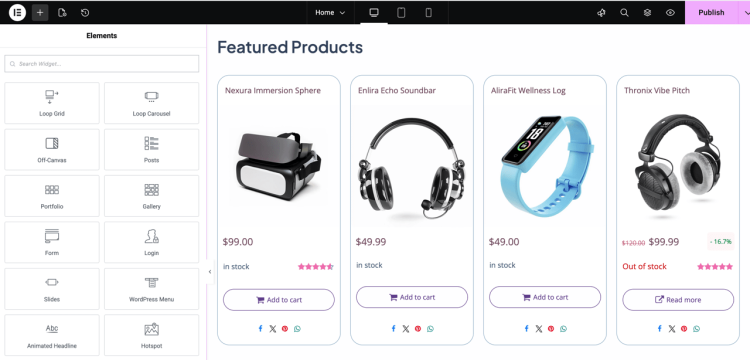
Styling can be applied at different levels, reused across layouts, and refined visually. For advanced use cases, Elementor also supports custom CSS, shortcodes, and the integration of native WordPress widgets. This allows developers and designers to combine visual workflows with technical flexibility.
Theme Builder's Display Conditions for layout control
Elementor is particularly well suited to websites that require different layouts in different contexts. Instead of applying the same design everywhere, it allows site owners to control how content is presented based on where and how it appears across the site.
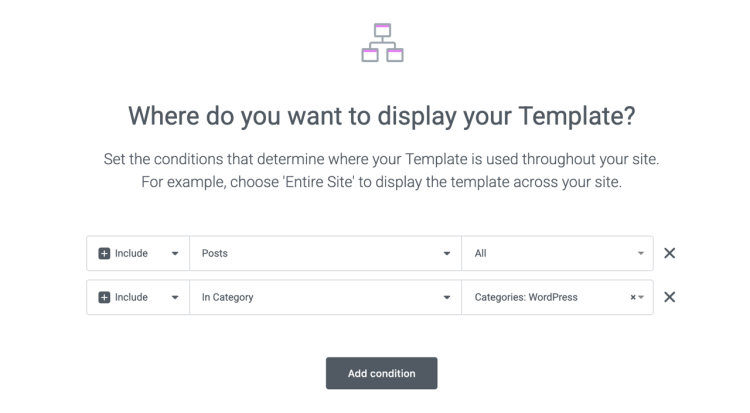
Through display conditions, layouts can be applied to pages, posts, products, archives, and compatible custom content types without changing how that content is created in WordPress. The same approach extends to global areas such as headers and footers, allowing the overall structure of the site to adapt based on context.
This level of control is useful for sites that serve multiple purposes, such as combining marketing pages, content libraries, ecommerce sections, and resources under one system. display conditions helps maintain consistency where it matters, while still allowing different sections of the site to follow different design rules.
Growing sites and long-term use
One of Elementor’s strengths is that it does not force early decisions. Sites can start simple and become more structured over time. Elementor Pro often covers many common growth requirements before external tools are needed.
When Elementor’s built-in features no longer cover a specific requirement, the wider Elementor community becomes relevant. Elementor has an active community of third-party extensions that add functionality while staying within the WordPress ecosystem.
This combination of core features, optional upgrades, and community-driven extensions allows Elementor to adapt to future needs without locking sites into a closed platform.
Top Tip: Elementor’s long-term value often comes from how well it scales. Core features, Pro tools, and community extensions make it easier to grow without rebuilding.
When visual editing meets WordPress development
For users who prefer to work with code but still value visual context, Elementor also supports hybrid workflows. Classic WordPress widgets, shortcodes, custom CSS, and JavaScript can all be added through dedicated Elementor modules, allowing developers to inject functionality directly into front-end interfaces. This makes it possible, to some extent, to combine traditional WordPress development patterns with a visual, editor-led workflow, rather than choosing one approach over the other.
See how Elementor compares to traditional WordPress building
What Elementor Doesn’t Try to Solve
Elementor is flexible and extensible, but it is not without limits. Most of these limits are not about missing features, but about how Elementor is designed to be used. Understanding this distinction helps set realistic expectations, especially for users planning to rely on Elementor long term.
Elementor supports custom CSS, JavaScript, shortcodes, classic WordPress widgets, and third-party extensions. In practice, this means many advanced requirements can be met within the editor. Where limitations appear is usually at the workflow or abstraction level, rather than capability.

Workflow preferences matter
Elementor introduces a visual layer between the user and WordPress. For many, this is the main benefit. For others, especially developers who prefer code-first workflows, this layer can feel indirect.
While Elementor provides structured ways to add and manage custom code, it still expects most layout and presentation work to happen inside the editor. If a project is heavily driven by command-line tools, version-controlled templates, or automated pipelines, Elementor may not feel like a natural fit.
Top Tip: Elementor doesn’t limit what you can build, but it does influence how you build it. Whether that’s a benefit or a drawback depends on your preferred workflow.
Design freedom requires structure
Elementor gives users a high degree of visual freedom. Without a clear design strategy, this flexibility can lead to inconsistent layouts or unnecessary complexity over time.
Elementor Pro helps mitigate this by enabling templates, global styles, and reusable elements, but it does not enforce structure by default. Teams and long-term projects benefit most when design systems and conventions are defined early.
Performance is shaped by usage
Elementor itself integrates cleanly with WordPress, but performance outcomes depend on how it is used. Dense layouts, excessive widgets, and heavy styling can impact load times, just as they would with any visual builder or theme.
Elementor provides tools to manage layout reuse and reduce repetition, but it does not prevent overbuilding. Performance is therefore influenced more by design decisions than by the tool alone.
Top Tip: Intentional layouts and reuse matter more than adding individual widgets. Elementor tends to perform best when design decisions are planned rather than improvised.
Not every project needs a visual builder
Some WordPress projects prioritise minimal markup, strict constraints, or automation over visual iteration. In these cases, even though Elementor can technically support custom code, its visual layer may be considered an overhead.
Elementor is most effective when layout, presentation, and front-end experience are central to the problem being solved. When they are not, simpler or more direct approaches may be adequate.
Top Tip: Elementor is a strong choice when visual design is part of the strategy. If it isn’t, its advantages may not be applicable.
Seen in this light, Elementor’s limitations are largely contextual. It is a powerful extension of WordPress that supports a wide range of use cases, but it reflects a specific way of building. Knowing when that approach aligns with your goals is key to using Elementor effectively.
Elementor and Performance: Context Matters
Performance is one of the most common concerns raised about Elementor. It’s also one of the areas where context is most often misunderstood. Elementor is frequently discussed as if it were a single influencer on WordPress site performance, when in reality performance is shaped by many interconnected decisions.
Elementor operates within WordPress, alongside your theme, plugins, media choices, and overall site structure. Its impact on performance depends far more on how it is used than on the fact that it is used at all.
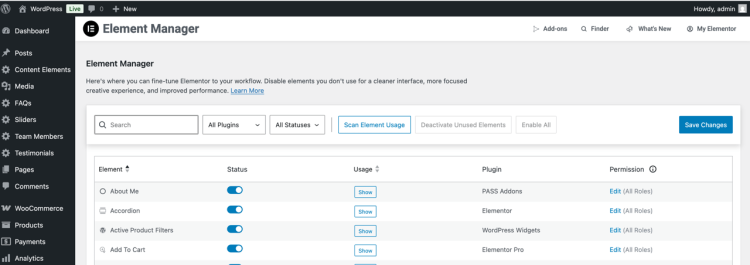
For performance, consider architecture and design strategically
Elementor makes it easy to create visually rich layouts. That flexibility can be an advantage, but it also means performance outcomes are closely tied to design decisions. Deeply nested sections, excessive widgets, heavy animations, and large media files can all add overhead.
This is not unique to Elementor. The same trade-offs apply when using complex themes or alternative page builders. Elementor lowers the barrier to creating complex builds, which can amplify poor structure if not planned carefully.
Top Tip: When performance suffers, simplify layouts before changing tools. Fewer sections and reusable patterns often make a difference.
Elementor is one layer in a larger stack
WordPress performance is influenced by multiple parts working together. Themes, plugins, media handling, and overall configuration all play a part. Elementor fits into this stack rather than replacing it.
Well-structured Elementor sites paired with sensible WordPress setups can perform reliably. Issues tend to appear when multiple heavy tools are integrated without a clear design or maintenance strategy.
Elementor Free vs Pro is not a performance divide
A common misconception is that Elementor Pro automatically makes sites slower. In practice, the difference between Elementor Free and Pro is about capability and workflow, not baseline performance.
Elementor Pro often reduces repetition by centralising layouts and templates. When used well, this can simplify page structures and make long-term maintenance easier, which can subsequently support better performance.
Top Tip: Elementor Pro does not slow sites by default. Performance is shaped by how features are applied.
Performance is usually a system-level outcome
Performance is best understood as an outcome of the entire WordPress setup, not a single plugin. Elementor contributes to that outcome, but it does not determine it in its entirety.
When Elementor is used with intention, within a well-considered WordPress setup, it can support fast and flexible sites without sacrificing visual control. Viewing performance through this broader lens helps shift discussions toward better design and configuration decisions.
How Elementor Compares Conceptually to Other Builders
Comparisons between page builders are common, but they often focus on features rather than philosophy. Looking at Elementor conceptually - how it approaches building sites, helps explain why experiences differ so much from one tool to another.
Elementor’s approach is centered on front-end visual editing layered on top of WordPress. This shapes how layouts are created, how design decisions are made, and how sites evolve over time.
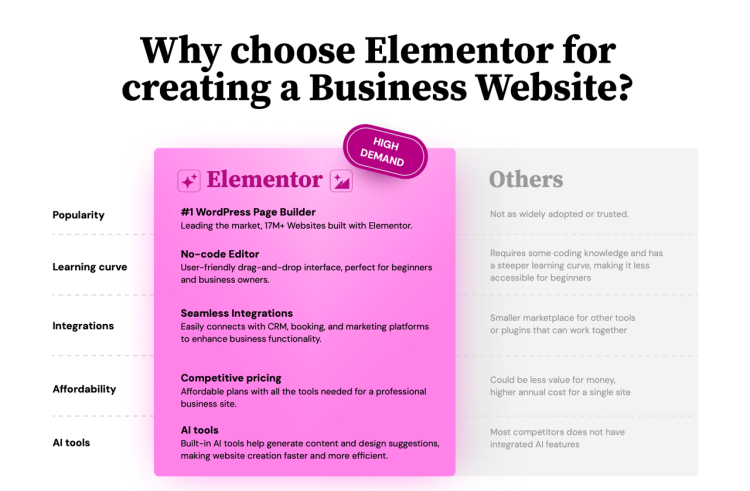
Visual-First vs Block-First Approaches
Some builders prioritise blocks and structured content first, encouraging users to assemble pages from predefined patterns. Elementor, by contrast, starts from the visual canvas. Layout, spacing, and presentation are adjusted directly on the page as it will appear to visitors.
This visual-first approach tends to appeal to users who think in terms of layout and design. It can feel more intuitive for shaping pages quickly, while other systems often feel different.
Top Tip: If you prefer designing by seeing changes immediately, a visual-first builder like Elementor often feels more natural.
Flexibility vs opinionated systems
Elementor is relatively unopinionated. It provides tools rather than strict rules. This allows a wide range of designs, but also places more responsibility on the user to establish consistency.
More opinionated builders guide users toward specific layouts and patterns. This can speed up simple projects but may feel restrictive as requirements grow.
Scaling workflows over time
As sites grow, workflow differences become more noticeable. Elementor’s model supports gradual progression: pages first, then templates, then systems. This aligns with how many WordPress sites develop in practice.
Other builders may excel at specific stages but feel limiting when moving beyond their intended scope. Elementor’s broader flexibility is one reason users often continue with it as sites become more complex.
Top Tip: The best builder is often the one that matches how your site is likely to grow, not just how it starts.
Choosing a builder based on fit
No builder is universally better than the others. Each reflects a different philosophy about how websites should be built and maintained.
Elementor tends to suit users who value visual control, iterative design, and long-term flexibility within WordPress. More constrained tools may be better for users who want strong defaults and minimal decision-making.
Explore more on using Elementor in professional WordPress websites
Who Elementor Is Really For
Everyone who needs a page builder - Elementor appeals to a wide range of WordPress users, but it is not designed to suit every workflow equally. Understanding who Elementor tends to work best for helps set realistic expectations and avoids forcing it into situations where another approach may feel more natural.
This distinction is especially useful for readers who already use Elementor and are deciding whether to continue building on it, as well as those evaluating it for the first time.
Beginners and first-time site builders
Elementor is often a good fit for beginners who want visual control without learning theme development or writing code from scratch. The front-end editor reduces abstraction and makes it easier to understand how pages are assembled.
For users who learn best by seeing immediate results, Elementor can shorten the learning curve and make WordPress feel more approachable.
Top Tip: If you want to understand how layouts work visually before diving into code, Elementor can be a practical starting point.
Site owners, marketers, and content teams
Elementor is well suited to site owners and teams who update content regularly and care about presentation. Marketing pages, landing pages, and content hubs benefit from being adjusted visually without depending on developers for every change.
This makes Elementor attractive for teams where design and content decisions evolve frequently.
Designers and hybrid developers
Designers and developers who prefer a hybrid workflow often find Elementor useful. Visual layouts can be created in the editor, while custom CSS, JavaScript, shortcodes, and native WordPress widgets handle more advanced requirements.
This allows Elementor to act as a bridge between visual design and traditional WordPress development, rather than replacing either approach.
Top Tip: Elementor works well when visual design and custom logic need to coexist in the same workflow.
Elementor may not be relevant for some workflows
Elementor may feel less suitable for users who prefer strictly code-first workflows, minimal interfaces, or highly automated build pipelines. While Elementor supports custom code, its core value lies in visual editing.
For projects where layout and presentation are secondary to logic or automation, Elementor’s visual layer may add unnecessary overhead - not just Elementor, but such projects does not need a page builder.
Understanding this distinction helps ensure Elementor is chosen deliberately.
How to Use This Elementor Guide as You Move Forward
This guide is intended to give you a clear, grounded understanding of what Elementor is, how it fits into WordPress, and where it tends to deliver the most value over time. Rather than focusing on tactics or features, it establishes context so future decisions feel informed rather than reactive.
📌 If you’re new to Elementor, this article helps set expectations early and avoids common misunderstandings. If you’re already using Elementor, it provides a framework for understanding why certain limitations appear, why upgrades often feel incremental, and how Elementor continues to fit as sites grow.

This page also serves as the foundation for all deeper Elementor-focused content on this site. Follow-up articles will build on the concepts introduced here, looking more closely at user-specific needs, workflows, and trade-offs without revisiting first principles each time.
By starting with a fundamental understanding of Elementor’s influence within WordPress, those future guides can focus on practical decisions rather than definitions. Whether you’re deciding how far to take Elementor or simply learning how others use it over time, this guide is designed to remain a useful reference point.
Top Tip: Use this guide as a reference, not a checklist. It’s meant to help frame decisions as your site evolves, not prescribe a solution.
From here, you can explore more targeted topics, including how different users grow with Elementor and how Elementor supports hybrid design and development workflows within WordPress.
Frequently Asked Questions
Is Elementor a WordPress theme or a plugin?
Elementor is a WordPress plugin. It works alongside a WordPress theme and does not replace the theme itself.
Can Elementor be used with any WordPress theme?
Elementor is designed to work with most modern WordPress themes. Some themes offer deeper integration, but Elementor does not require a specific theme to function.
Does Elementor work without Elementor Pro?
Yes. Elementor offers a free version that provides core visual editing features. Elementor Pro adds additional functionality but is not required to use the editor.
What does Elementor Pro add compared to the free version?
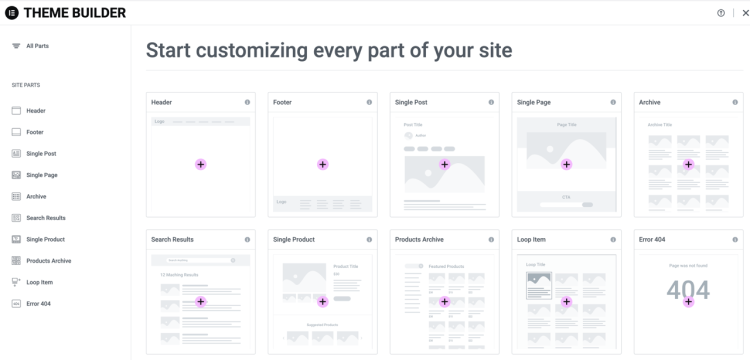
Elementor Pro adds features such as theme building, templates, dynamic content, and advanced design controls. These features extend how Elementor can be used but do not change its core role as a page builder. In addition, Elementor Pro often serves as a foundation for integrating other compliant extensions, such as Ally or Mailer.
Does Elementor replace the WordPress block editor?
No. Elementor operates as an alternative editing interface for pages and layouts. The WordPress block editor remains available and can still be used alongside Elementor.
Can Elementor be used with custom code?
Yes. Elementor supports hybrid workflows, including custom CSS, JavaScript, shortcodes, and legacy WordPress widgets, allowing visual editing and custom development to coexist.
Is Elementor suitable for large or long-term WordPress sites?
Elementor is commonly used on sites of varying sizes. Its use of templates, global styles, and reusable components can support long-term maintenance when configured appropriately.
Does using Elementor affect WordPress updates?
Elementor is updated independently of WordPress core. Like other plugins, it relies on compatibility with WordPress updates, which are managed through regular releases.
Are Elementor’s additional products required to use the page builder?
No. Elementor offers additional products and services separately, but they are not required to install or use the Elementor page builder or Elementor Pro.
Is Elementor only intended for beginners?
No. While Elementor is accessible to beginners, it is also used in more advanced workflows where visual layout control, reusable templates, and hybrid development patterns are required.