Elementor Pro Pricing Overview
Top Tip: Elementor Pro pricing makes the most sense when you evaluate it against your workflow and site scope, not just the headline annual cost.
Elementor Pro pricing is best understood in context. The upgrade is not just about visual design improvements, but more about gaining site-wide control, advanced workflows, and built-in tools that overlap with functionality commonly handled by separate plugins.
This guide looks at Elementor Pro from a reviewer’s perspective: what you get beyond the free version, how plans are structured, and which use cases different pricing tiers are designed to support. If you’re still getting familiar with the builder itself, you may find it helpful to start with our overview of what Elementor is before comparing plans.
Rather than jumping straight into prices, the article first clarifies feature differences and practical value. That context matters, especially if you’re deciding whether upgrading from the free version is worthwhile at all. A deeper Elementor Free vs Pro comparison later in the guide covers that decision in more detail.
If you want to keep Elementor’s official pricing page open for reference while reading, you can open Elementor pricing here
🎯 Who This Guide Is For: WordPress users weighing Elementor Free against Pro, site owners comparing plan tiers, and developers or agencies managing multiple sites who want a clear, non-prescriptive breakdown of pricing and use cases.
⏸ Who This Guide May Not Be Ideal For: Readers looking for step-by-step Elementor tutorials or design walkthroughs. This article focuses on pricing structure, feature scope, and plan selection rather than hands-on setup.
How Elementor Pro Pricing and Plans Work
Top Tip: Plans are easier to compare once you separate what’s included from how allowances scale across tiers.
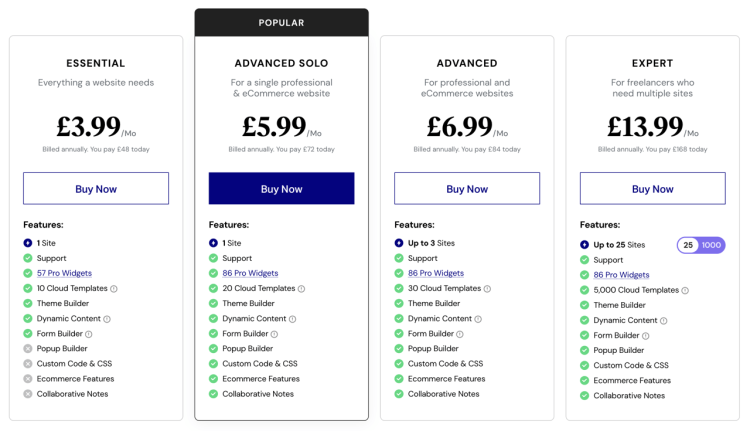
Elementor Pro is sold as an annual subscription, with plans structured around site limits and feature allowances. Pricing scales based on how many sites you can activate and how much access you get to resources such as Pro widgets and Cloud Templates.
At a high level, all Pro plans cover the same core feature categories: Pro widgets, Cloud Templates, Theme Builder, Dynamic Content, Form Builder, Popup Builder, Custom Code and CSS, ecommerce features, Collaborative Notes, and premium support. The differences between plans show up in allowances and limits, not in whether those categories exist.
Theme Builder is included across all tiers, with Display Conditions used to control where templates apply across a site. Plan choice affects how broadly you can use Pro based on site limits and allowances.
A plan-by-plan breakdown of prices and limits appears in the Elementor Pro plans comparison section. For reference, you can also review Elementor’s official pricing page here: Elementor pricing
Elementor Pro Cost vs Free Version
Top Tip: The upgrade decision is usually about scope. Elementor Free covers individual pages well, while Pro is designed for site-wide control and more complex workflows.

Elementor Free focuses on page-level building and is often sufficient for straightforward layouts. It works well when design needs are limited to individual pages or posts.
Elementor Pro extends that foundation with tools aimed at managing layouts and functionality across an entire site. This includes site-wide templates, dynamic content, forms, popups, ecommerce-related elements, and collaboration features.
The table below compares Elementor Free and Pro at a capability level. It highlights where Pro meaningfully expands what’s possible, without getting into low-level implementation details. If you want a deeper, feature-by-feature breakdown, see our dedicated Elementor Free vs Pro guide.
Key Differences: Elementor Free vs Pro
| Feature | Elementor Free | Elementor Pro |
|---|---|---|
| Price | Free | From $59/year |
| Templates | Limited | 300+ |
| Widgets | 30+ (Basic) | 85+ (Advanced) |
| Theme Builder | ❌ | ✅ |
| E-commerce Features | ❌ | ✅ |
| Dynamic Content | ❌ | ✅ |
| Marketing Features | ❌ | ✅ |
| Popup Builder | ❌ | ✅ |
| Custom Code & CSS | ❌ | ✅ |
| Support | Community | Premium support |
Source (Accessed, Dec 2025): Elementor Pricing
For users building beyond a single static page, these additions tend to matter more over time. The next section looks at how these capabilities are packaged across plans and how pricing scales in practice.
You can also review Elementor’s official feature overview alongside this comparison here: Elementor Pro
Elementor Pro Plans Comparison
Top Tip: Treat the plan table as a scaling guide: match the tier to your site count first, then sanity-check whether the allowances fit how you build.
This section compares Elementor Pro plans based on price, supported sites, and key allowances such as Cloud Templates and Pro widgets. It’s designed to help you pick a tier that fits how you work, without overbuying capacity you won’t use.
| Plan | Annual price | Sites | Cloud Templates | Pro widgets | Typical use case |
|---|---|---|---|---|---|
| Essential | $59/year | 1 site | 10 | 57 | Single site with lighter widget and template needs |
| Advanced Solo | $84/year | 1 site | 20 | 86 | Single site with higher allowances and more Pro widgets |
| Advanced | $99/year | 3 sites | 30 | 86 | 1–3 sites, testing ideas |
| Expert | $199–$399/year | 25–1000 sites | 5,000 | 86 | Multiple sites for client work or larger portfolios |
Source (Accessed, Dec 2025): Elementor Pricing
For reference, you can also review Elementor’s official pricing page here: Elementor Pro pricing
Elementor Pro Pricing Deals, Discounts & Promotions
Top Tip: Larger discounts tend to be seasonal. If timing is flexible, waiting for established sale periods can materially reduce first-year cost.
Elementor occasionally offers promotions that reduce the first-year price of Pro plans. These discounts do not change plan structure or feature availability, but they can meaningfully affect upfront cost.
Historically, the most substantial discounts have appeared around predictable periods such as Black Friday and Elementor’s own anniversary or birthday promotions. Outside of these windows, discounts tend to be smaller or less frequent.
When considering a promotion, it’s still worth factoring in renewal pricing and longer-term needs. As WordPress sites grow, requirements around templates, dynamic content, and managing multiple sites often expand as well. We explore that progression in more detail in our guide on how Elementor fits as WordPress sites grow.
For current promotions and official pricing details, you can review Elementor’s pricing page directly here: Elementor Pro pricing page
Is Elementor Pro Worth It?
Top Tip: Elementor Pro is easiest to evaluate once you’ve identified where the free version starts to slow you down.
If you’re already using Elementor Free, the upgrade decision usually hinges on whether you need more control and integrated tools. Pro adds site-wide templates, dynamic content, forms, popups, ecommerce features, and workflow enhancements that go beyond page-level design.
If you want to review what those additional features look like in practice, you can explore the current Pro feature set and plans here: Elementor website
If you’re still deciding whether a visual builder is the right approach at all, it may help to step back and compare methodologies. Our guide on Elementor vs traditional WordPress building looks at when a builder-based workflow makes sense.
Use case also matters. For content-focused sites, our article on using Elementor for blogging explores whether Pro adds meaningful value. For commercial projects, Elementor for business websites covers where Pro tends to justify its cost.
Which Elementor Pro Plan Should You Choose?
Top Tip: Choose your plan by working backwards from what you need to build (specific Pro tools), then confirm the tier fits your site count and allowances.
If you’re considering Elementor Pro, it usually means Elementor Free has already shown its limits in your workflow. The more useful question becomes which Pro tier fits your use case, based on the tools you need and the allowances you’ll realistically use.
Start with feature requirements. If you need a lean Pro setup for a single site and your build requirements are modest, Essential can be a workable entry point. It offers fewer Pro widgets and smaller Cloud Template allowances, and it doesn’t include everything available in higher tiers, so it’s best viewed as “starter Pro” rather than a full unlock.
If your site depends on broader Pro tooling and higher allowances, moving up a tier can reduce friction. Advanced Solo and Advanced increase Cloud Templates and Pro widgets, and Advanced also covers multiple sites, which tends to matter quickly once you start testing ideas or managing more than one project.
If you’re managing client sites or a larger portfolio, Expert is primarily a scaling plan. The value here is less about individual tools and more about covering many sites under one license with high allowances.
If you want more context before choosing, our Elementor Free vs Pro comparison explains what changes when you upgrade, and Elementor as WordPress sites grow covers how plan requirements typically evolve over time.
To review current pricing and plan limits in detail, you can check our updated pricing resource here: Elementor Pro pricing
Final Thoughts on Elementor Pro Pricing
Top Tip: If you’re already using Elementor Free, pricing decisions get easier once you name the missing features you keep working around and map them to the right Pro tier.
Elementor Pro pricing is ultimately about matching capability and allowances to how you build and maintain your WordPress site. For most people considering Pro, the free version is already “usable,” but it leaves meaningful gaps that show up as projects expand or requirements become more specific.
In practice, the decision is less about whether Elementor Free can build pages and more about whether you want the Pro toolset and the flexibility that comes with higher allowances. Once you know which Pro features you’re trying to unlock, plan selection becomes a straightforward mix of site count, widget availability, and Cloud Template headroom.
If you want to revisit what changes when you upgrade, our Elementor Free vs Pro guide provides a clearer feature-level comparison. For longer-term planning, Elementor as WordPress sites grow covers how needs typically evolve as a site becomes more complex.
To review current pricing and plan limits before deciding, you can check our pricing resource here: Elementor Pro pricing
Frequently Asked Questions
Q: Do all Elementor Pro plans include the same core features?
A: Yes. All Elementor Pro plans include the same core feature categories, such as Theme Builder, Dynamic Content, forms, popups, and ecommerce features. The main differences between plans are site limits and feature allowances.
Q: What’s the main difference between Elementor Free and Elementor Pro?
A: Elementor Free is focused on page-level design, while Elementor Pro adds site-wide control, advanced workflows, and integrated tools for managing templates, dynamic content, and more complex layouts.
Q: Are Display Conditions available in all Elementor Pro plans?
A: Yes. Display Conditions are part of Theme Builder, which is included in all Elementor Pro plans. Plan choice affects scale, such as how many sites you can apply those templates to.
Q: Can I use Elementor Pro on multiple sites?
A: You can use Elementor Pro on multiple sites as long as your plan’s site limit allows it. Each plan specifies how many sites can be activated under a single license.
Q: Is Elementor Pro worth it for just one website?
A: It can be. For single-site owners who need site-wide templates, forms, dynamic content, or more advanced layout control, Elementor Pro can justify its cost even at the lower tiers.