Elementor Free vs Elementor Pro: Which Version Is Best for WordPress? Choosing the right WordPress page builder can feel overwhelming, especially with so many options available. Elementor has become one of the most popular page builders, offering both a Free version and a Pro version with advanced features.
In this guide, we’ll explore Elementor Free vs Elementor Pro, highlighting the key differences and benefits to help you identify which version best matches your website goals. Whether you’re building a blog, portfolio, business, or e-commerce site, Elementor offers solutions for a wide range of website types.
Why Elementor Free vs Pro Comparison Matters
- Save time: Choose the right version without trial and error
- Avoid unnecessary costs: Discover whether upgrading to Pro makes sense
- Boost website potential: Understand which features can help your site grow
Elementor Free vs Pro at a Glance
| Feature | Elementor Free | Elementor Pro |
|---|---|---|
| Price | Free | From $59/year |
| Drag & Drop | ✅ | ✅ |
| Widgets | 30+ (Basic) | 85+ (Advanced) |
| Advanced Features | ❌ | ✅ |
Source: elementor.com
Top Tip: Start by exploring Elementor Free to get comfortable with its interface. Upgrade to Pro when you need advanced widgets, templates, or theme-building tools.
What Is Elementor? Free vs Pro Guide for WordPress Beginners
Elementor is a popular WordPress page builder plugin that enables users to create visually engaging websites without coding. Its drag-and-drop editor, pre-designed templates, and advanced widgets make it suitable for beginners, developers, and tech enthusiasts.
Elementor integrates seamlessly with WordPress themes and the Gutenberg editor, allowing you to design blogs, business websites, and e-commerce stores with ease.
Key Benefits of Elementor
- Visual Design Made Easy: Drag-and-drop interface with real-time previews
- Scalable for All Website Types: Blogs, business sites, portfolios, and online stores
- Seamless WordPress Integration: Works with most themes, legacy widgets, shortcodes, code snippets, and Gutenberg blocks
Top Tip: Even beginners can create professional pages using Elementor’s free templates and essential widgets before deciding whether to upgrade to Pro.
Elementor Free Features and Benefits: Can You Build a Website Without Pro?
Elementor Free is the entry-level version designed to help beginners and hobbyists build professional-looking websites without coding. While more limited than Pro, it offers essential widgets, templates, and responsive design controls.
Essential Elementor Free Features
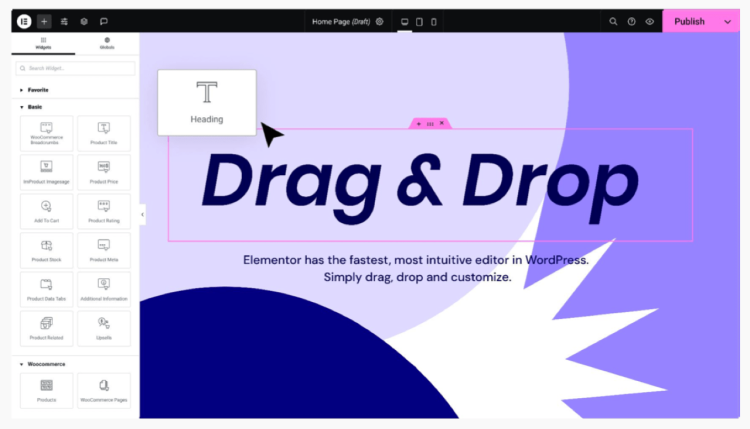
- Drag-and-Drop Editor: Visual editor with real-time updates
- Responsive Design Controls: Mobile-friendly layouts adjustable per device
- Pre-Designed Templates & Blocks: Launch pages quickly using a limited template library
- 30+ Essential Widgets: Text, Image, Button, Video, Spacer, Divider
- Beginner-Friendly Interface: Intuitive and easy to use, with no coding required
Top Tip: Start with Elementor Free to explore layouts and widgets. Upgrade to Pro only when you need advanced design or e-commerce features.
See our comparison of the two editions of Elementor: Free vs Pro.
Elementor Pro features and benefits: why upgrade to Pro
Elementor Pro extends Elementor beyond individual page design into site-wide layout and presentation control. While Elementor Free focuses on building standalone pages, Pro introduces tools that determine how different parts of a WordPress site are displayed based on context.
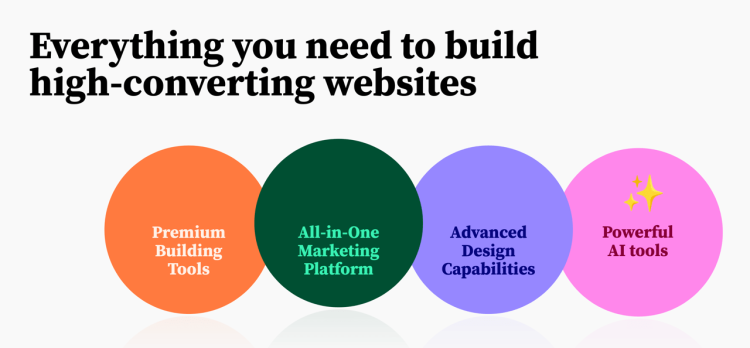
For many users, the decision to upgrade is not driven by additional widgets alone. Instead, it is driven by the need to move beyond theme defaults and manage design consistently across pages, posts, products, archives, and other dynamic content types.
Conditional display with Theme Builder
One of the most important differences between Elementor Free and Elementor Pro is access to the Theme Builder with conditional display. This allows layouts to be applied automatically depending on where and how content appears, rather than being assigned manually to individual items.
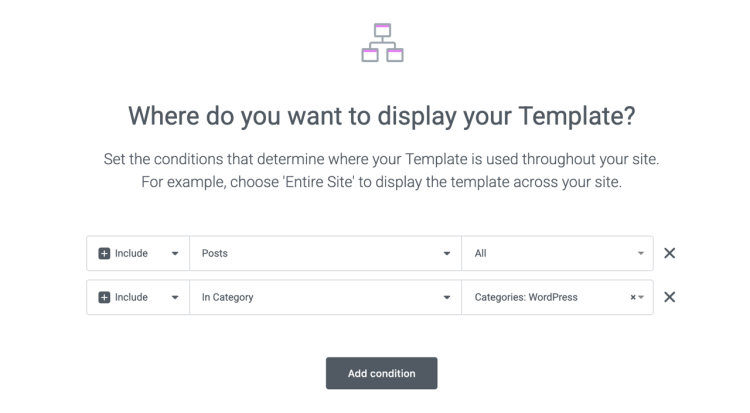
With conditional display, Elementor Pro can control the presentation of standard pages, single blog posts, category and archive pages, WooCommerce products, and compatible custom post types. Display conditions define when a layout is used, based on content type, taxonomy, or specific rules.
In practice, this means different layouts can be used for different purposes across the site. A business may apply one design to core pages, another to long-form content, a dedicated layout for product pages, and separate structures for resource libraries or knowledge bases. Conditional display can even target a single, specific item when needed.
Importantly, this does not change how content is created. Pages, posts, and products are still managed through WordPress and its editors. Conditional display affects only how that content is presented to visitors, allowing the site’s structure and design to reflect intent and context.
Without conditional display, layouts for dynamic content rely on theme defaults or custom development. Elementor Pro replaces those limitations with a visual system that can evolve as the site grows, without requiring a theme change or extensive code maintenance.
Additional Elementor Pro capabilities
Alongside conditional display, Elementor Pro includes tools that support more advanced workflows and site requirements:
- Advanced widgets and templates: Additional widgets and professionally designed templates for faster layout creation.
- WooCommerce Builder: Visual control over product pages, shop layouts, and e-commerce–related templates.
- Marketing tools: Forms, pop-ups, and integrations designed to support lead generation and conversions.
- Custom CSS and integrations: More granular styling options and third-party tool connections.
- Premium support and documentation: Access to official resources and direct assistance.
Top Tip: Elementor Pro’s real value comes from conditional display across the entire site, not just from adding more design options to individual pages.
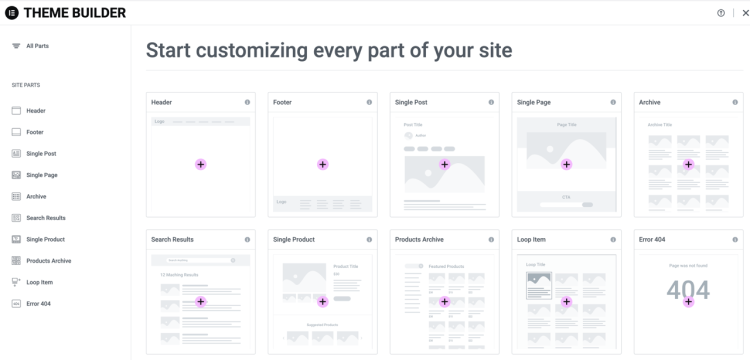
If your site includes more than static pages, understanding how Elementor Pro handles conditional display can help clarify whether the upgrade supports your long-term structure and goals. Explore Elementor Pro features →
Elementor Free vs Pro Feature Comparison
Choosing between Elementor Free and Pro depends on your website goals. Both versions offer a drag-and-drop editor, but Elementor Pro provides significantly more features, templates, marketing tools, and premium support.
Key Differences: Elementor Free vs Pro
| Feature | Elementor Free | Elementor Pro |
|---|---|---|
| Price | Free | From $59/year |
| Templates | Limited | 300+ |
| Widgets | 30+ (Basic) | 85+ (Advanced) |
| Theme Builder | ❌ | ✅ |
| E-commerce Features | ❌ | ✅ |
| Dynamic Content | ❌ | ✅ |
| Marketing Features | ❌ | ✅ |
| Form Builder | ❌ | ✅ |
| Popup Builder | ❌ | ✅ |
| Custom Code & CSS | ❌ | ✅ |
| Collaborative Notes | ❌ | ✅ |
| Support | Community | Premium support |
Source (Accessed, Dec 2025): Elementor Pricing
Top Tip: For simple blogs or personal sites, start with Elementor Free. Upgrade to Pro when you need advanced templates, WooCommerce integration, or marketing tools.
Free or Pro? Suggested Use Cases
The choice between Elementor Free and Pro depends on your website goals, technical skills, and budget. Both versions offer a drag-and-drop editor, but the range of available features differs significantly.
Who Should Use Elementor Free: Beginners & Small Sites
- Beginners and hobbyists building personal blogs or portfolios
- Small business websites with basic functionality
- Users experimenting with WordPress page building
- Those who want a free, fast, and simple solution
Who Should Use Elementor Pro: Businesses & Advanced Sites
- Business owners, agencies, and professional developers
- E-commerce stores that require WooCommerce integration
- Marketing-focused websites using pop-ups and lead-generation forms
- Users who need advanced templates, widgets, and theme-building tools
Top Tip: Start with Elementor Free to test layouts and functionality. Upgrade to Pro when advanced widgets, marketing tools, or e-commerce features become necessary.
For a deeper look at how Elementor fits into different workflows, see Who Elementor Is Best For.
Elementor Pricing & Plans: Free vs Pro Cost Breakdown
Elementor offers a Free version and multiple Pro plans, depending on the number of sites and features needed. Understanding the costs helps you decide which version best fits your goals.
Elementor Free Plan: Features & Benefits
- Price: $0
- Features: Drag-and-drop editor, basic widgets, limited templates, responsive design, Gutenberg compatibility, community support
- Best for: Beginners, small blogs, portfolios, and simple business websites
Elementor Pro Plans: Features, Pricing, and Licenses
Pro plans vary based on the number of websites:
| Plan | Price/Year | Sites | Key Features |
|---|---|---|---|
| Essential | $59 | 1 | 56+ Pro widgets, 10 cloud templates, theme builder, premium support |
| Advanced | $84 - $99 | 1 - 33 | 85+ Pro widgets, 20 - 30 cloud templates |
| Agency | $199 - $399 | 25 – 1000 | All Advanced features, 50,000 cloud templates |
Source (Accessed, Dec 2025): Elementor Pricing
Top Tip: Test Elementor Free to explore its capabilities. Choose a Pro plan that matches your number of websites and desired features for the best value.
See Elementor Pro pricing for a deeper dive into Elementor Pro costs and plan differences.
Pros and Cons: What You Should Know
Comparing the pros and cons of each version helps you make an informed decision. Both offer clear advantages, but Elementor Pro adds premium features designed for advanced users and businesses.
Elementor Free Pros and Cons
Pros:
- No cost: Start building without investment
- Beginner-friendly drag-and-drop editor with responsive layouts
- Gutenberg compatible
- Community support available
Cons:
- Limited templates and widgets
- No theme builder or advanced customization
- No built-in marketing or WooCommerce tools
- Support limited to community resources
Elementor Pro Pros and Cons
Pros:
- Advanced widgets, templates, and theme builder
- Marketing tools and WooCommerce integration
- Premium support and documentation
- Full customization and design flexibility
Cons:
- Requires an annual subscription
- Advanced features may involve a learning curve
Top Tip: Use Elementor Free for simple sites. Upgrade to Pro for professional websites that require advanced design, e-commerce, or marketing tools.
Check current Elementor Pro plans to unlock premium features designed for growing and professional websites.
Conceptual Differences Between Elementor Free and Pro
Comparisons between Elementor Free and Elementor Pro often revolve around feature lists. In practice, the more meaningful distinction lies in how each version supports different approaches to building and maintaining WordPress websites over time.
Although both versions share the same visual editor, they reflect two different perspectives on site building: one centered on individual pages, and the other designed for broader, system-level control and long-term scalability.
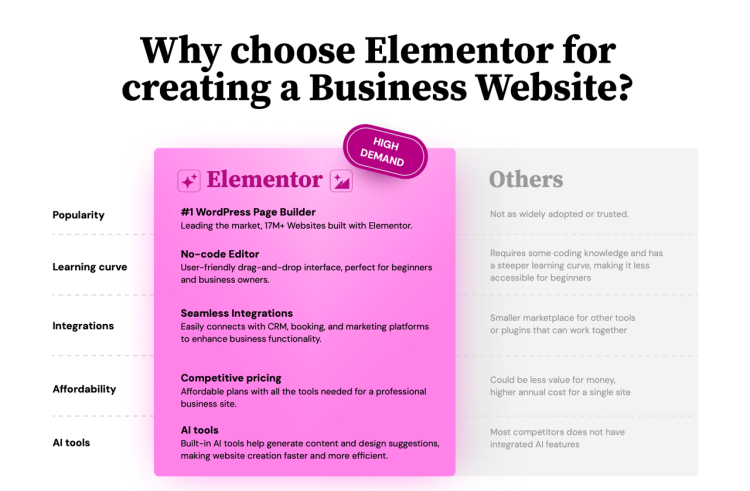
Page-Level Editing vs Site-Level Control
Elementor Free is primarily oriented around page-level design. It allows users to build and adjust individual pages visually, working directly on layout, spacing, and content. For many beginners and smaller sites, this approach is entirely sufficient.
Elementor Pro builds on the same visual foundation but extends it beyond individual pages. Site-level tools such as Theme Builder, global elements, and dynamic content make it possible to manage headers, footers, templates, and repeated layouts as part of a connected system rather than as isolated designs.
Top Tip: If your focus is on designing individual pages, Elementor Free often feels complete. When consistency across an entire site becomes important, Pro tends to feel more practical.
Freedom vs Responsibility
Elementor Free provides a flexible and lightweight environment. It offers creative freedom without enforcing structure, which keeps the learning curve low but can lead to repeated manual work as sites expand.
Elementor Pro introduces a greater emphasis on intentional design systems. Features such as global widgets, templates, and dynamic content encourage consistency, but they also require more planning. This balance between freedom and structure is often what separates casual site building from more professional workflows.
How Each Version Supports Growth
Many WordPress sites begin with simple requirements and evolve gradually. Elementor Free supports this early phase well, allowing users to experiment, publish, and iterate without added complexity.
As sites grow, managing repeated layouts, marketing elements, or e-commerce components becomes more demanding in the free version. Elementor Pro is designed to support this progression by enabling reusable structures and centralized control, helping reduce long-term maintenance effort.
Top Tip: The value of Elementor Pro often becomes clearer over time, when maintaining consistency and managing updates matters more than simply designing pages.
Choosing Based on How You Build
Neither Elementor Free nor Elementor Pro is inherently better in isolation. Each version aligns with different stages of a website’s lifecycle and different working preferences.
Elementor Free suits users who prioritise simplicity and page-by-page control. Elementor Pro is better suited to those who want a more structured and scalable approach, while still retaining full visual flexibility within WordPress.
Explore more on using Elementor for professional and growing WordPress websites
How to Upgrade Elementor Free to Pro: Step-by-Step Guide
Upgrading to Elementor Pro unlocks advanced features, templates, WooCommerce tools, and marketing integrations. Follow this step-by-step guide for a smooth upgrade.
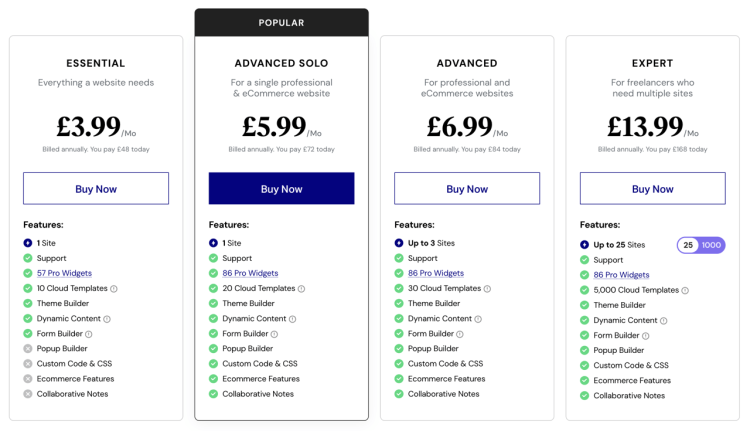
Step 1: Choose the Best Elementor Pro Plan
Select the Pro plan that fits your number of sites and feature needs: Essential, Advanced, or Expert.
Step 2: Download the Elementor Pro Plugin
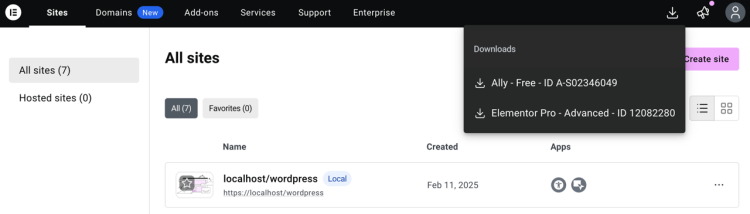
Log in to your elementor.com dashboard and click the download icon in the top-right corner to download the latest version of Elementor Pro.
Step 3: Install & Activate Elementor Pro
- Log in to your WordPress dashboard
- Go to Plugins > Add New > Upload Plugin
- Upload the ZIP file and click Install Now
- Click Activate Plugin
Step 4: Connect Your Elementor Pro License
- Log in to your WordPress dashboard
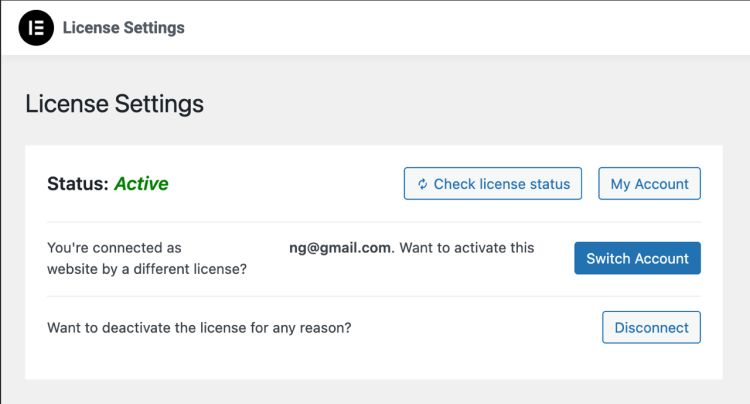
- Go to Elementor > License
- Click the connect button and follow the on-screen instructions
Top Tip: Back up your website and ensure Elementor Free is updated before upgrading to Pro to help prevent conflicts.
Conclusion: Elementor Free vs Pro — Making the Right Choice
Elementor Free can be adequate for beginners, small blogs, and simple websites. It provides a solid drag-and-drop editor, works well with Gutenberg, and allows users to build clean, responsive pages without any upfront cost.
Elementor Pro is better suited to websites of any size that need additional features, greater flexibility, and long-term scalability. It adds advanced widgets, professional templates, full theme building, WooCommerce customization, and built-in marketing tools. For business websites, client projects, online stores, or content-driven sites that rely on conversions, these additions can make a noticeable difference in both workflow and results.
If you are just starting out, testing ideas, or building a straightforward site, staying on the free version makes sense. You can also explore our detailed review of how Elementor fits into WordPress. However, if you begin to feel limited by layout options, templates, or the lack of dynamic and marketing features, upgrading to Pro becomes a practical step rather than a luxury. We also provide an extensive overview of the possible evolution of WordPress websites that use Elementor.
For a detailed breakdown of what changes when you upgrade, including advanced widgets, popups, dynamic content, and other premium tools, see the full comparison here
Top Tip: Start with Elementor Free to understand how the builder works. Upgrade to Elementor Pro only when advanced design control, marketing features, or WooCommerce customization become necessary for your site.
If you’re ready to explore what’s included and decide whether the upgrade fits your goals, Explore Pro features to unlock all features and templates.
Elementor Free vs Pro FAQ: Common Questions Answered
Clear answers to common questions people ask when deciding between Elementor Free and Elementor Pro.
1. Is Elementor Pro worth it compared to the free version?
Elementor Pro is worth it if you need advanced design control, professional templates, marketing tools, or WooCommerce customization. For simple blogs or basic websites, Elementor Free is often sufficient.
2. What are the main limitations of Elementor Free?
Elementor Free lacks advanced widgets, theme building, popup creation, dynamic content, and WooCommerce customization. These limitations usually become noticeable as a website grows or requires more flexibility.
3. When should I upgrade from Elementor Free to Pro?
Most users upgrade when they need custom headers and footers, better templates, forms, popups, or marketing features. If you find yourself using workarounds or extra plugins, upgrading to Pro often simplifies your setup.
4. Does upgrading to Elementor Pro affect existing content?
No. Upgrading to Elementor Pro does not change or remove existing pages. All your content remains intact, and Pro features simply become available inside the editor.
5. Can Elementor Pro replace multiple WordPress plugins?
In many cases, yes. Elementor Pro can replace separate plugins for forms, popups, basic marketing tools, and some layout-related functionality, which can help reduce plugin bloat.
Top Tip: If your site relies on conversions, lead generation, or WooCommerce, Elementor Pro often pays for itself by reducing plugin dependency and speeding up your workflow.