Is Elementor Good for Blogging?
Yes — Elementor is a strong choice for blogging when the goal is to shape how content is experienced across a site, not just how individual pages look. It fits particularly well for blogs that care about structure, consistency, and guiding readers through predictable user experience.
Elementor works alongside WordPress and the active theme, focusing on layout and user experience while content creation remains unchanged. This makes it well suited for blogs that want designed pages, consistent blog layouts, and room to evolve without disrupting publishing.
Top Tip: Themes provide structure, while Elementor can help align user experience with site intent.
The real value shows up when Elementor is used intentionally: defining structure at a broader level, applying it consistently, and supporting different content goals with appropriate flow. That approach is explored in detail later, especially in Effective Ways to Use Elementor for Blogging.
If you want a broader view of how Elementor fits within WordPress, see What Is Elementor. For perspective on how this approach scales over time, How Elementor Fits as WordPress Sites Grow provides additional context.
🎯 Who This Guide Is For: Bloggers and WordPress users who want clearer structure, consistent layouts, and more control over how blog content fits into the wider site.
⏸ Who This Guide May Not Be Ideal For: Sites that plan to rely entirely on theme defaults and do not intend to manage layout or user experience beyond basic setup.
How Elementor Fits Into Modern WordPress Blogging
Modern WordPress blogs often include more than posts alone. Homepages, category hubs, resource sections, and supporting pages all play a role in how content is discovered and navigated.
Elementor fits into this environment by focusing on structure and flow. It allows site owners to shape layouts across key areas of the site, while WordPress continues to handle content creation and publishing.
This approach becomes especially relevant as blogs evolve into broader content platforms or business-adjacent sites. Elementor can support clearer journeys and navigation in these scenarios, which is also discussed in using Elementor for business websites.
By centralizing layout decisions, Elementor helps maintain alignment across pages and blog content as a site grows. This idea is explored further in how Elementor supports design consistency, and in who Elementor is best suited for based on different site goals.
Top Tip: Elementor works best when it provides a shared system rather than one-off page designs.
What Bloggers Actually Need From a Page Builder
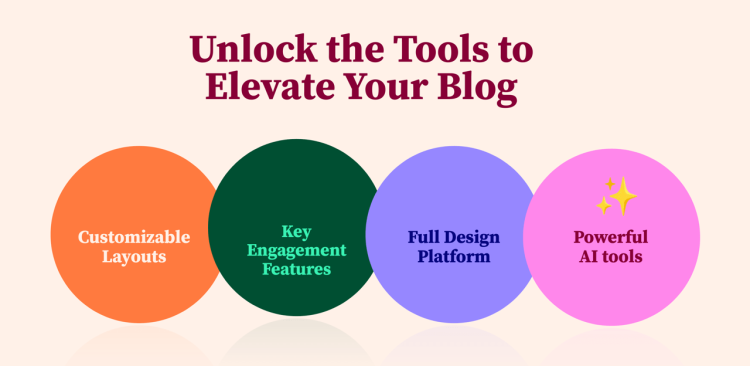
For blogging-focused sites, the main requirement from a page builder is consistent structure paired with a coherent user experience. Pages, posts, and category views should feel connected and purposeful without adding friction to the publishing process.
Elementor supports this by providing tools that shape layout, flow, and behavior without changing how content is created. Experience-level decisions can be applied consistently, instead of being handled on a page-by-page basis.
As a site grows, additional capabilities can become useful. Elementor Pro extends this control through reusable structures and dynamic elements, making it possible to guide readers more intentionally while keeping the setup appropriate for small to mid-sized content sites.
Top Tip: The most effective blogging setups combine repeatable structure with a user experience that reflects site intent.
Elementor Free vs Pro for Blogging
Elementor Free provides a reasonable starting point for working visually within WordPress. It allows users to design individual pages, but it does not include the capabilities required to control how blog posts, category pages, or other dynamic content behave across the site.
For blogging, this distinction matters. Blog content relies on shared layouts to maintain consistency. Elementor Pro introduces site-wide control that allows the same structural rules to apply across posts, archives, and other blog-related views.
Elementor Pro is available in multiple editions, which makes it adaptable to different site sizes and goals. It typically becomes relevant when a blog moves beyond page design and needs its content to follow intentional patterns across the site.
Top Tip: Elementor Pro tends to matter once blog content needs to behave consistently, not just look consistent.
Effective Ways to Use Elementor for Blogging
Elementor becomes far more effective for blogging when it is used as a system for managing how content functions across the site. At this stage, the focus shifts from individual page design to shaping how different types of content support different goals.
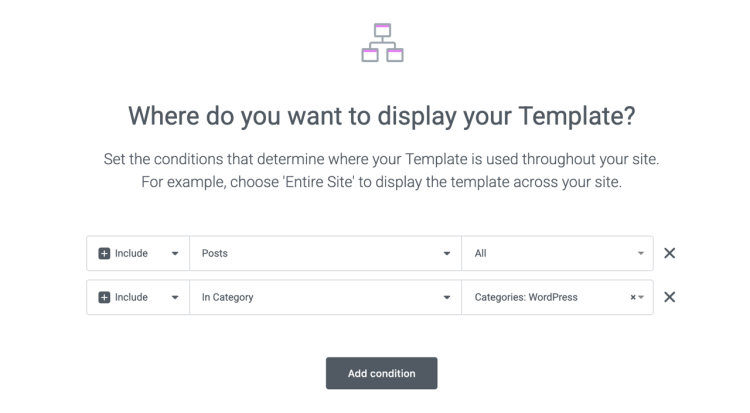
A strategic use of Elementor involves conditionally applying templates based on context. Instead of treating all posts the same, layouts can be assigned using display conditions so different content types follow different structural rules, without adding friction to publishing.
This model works especially well for blogs that serve multiple user journeys. Informational content, evaluative content, and action-oriented content can each follow layouts that support how readers engage, while still feeling part of the same site.
Elementor Pro supports this approach by bringing layout control, dynamic data, and engagement elements into a single system. Used together, these tools allow blogs to introduce sign-ups, calls to action, and interaction points as part of the structure, rather than as manual additions.
This is typically the point where upgrading to Elementor Pro makes sense for blogging-focused sites that want to grow without increasing editorial overhead.
Top Tip: Blogs gain the most value from Elementor when templates are applied conditionally to support different content goals.
How Elementor Compares Conceptually to Other Builders
Comparing page builders is often framed around features, but the more meaningful difference lies in how each tool approaches building and maintaining a site. Elementor follows a visual-first model layered on top of WordPress, which shapes how layouts are created and how sites evolve over time.
This approach favors direct visual control. Structure and spacing are adjusted in context, as they appear to visitors. Other systems place more emphasis on predefined blocks or patterns, which can feel more structured but less adaptable as requirements change.
Another distinction is flexibility. Elementor provides tools without enforcing strict layout rules. This allows blogs to adapt as content grows, while placing responsibility on the site owner to define consistency through shared systems.
From a workflow perspective, Elementor supports gradual adoption. A site can start with a few designed pages, then expand into templates and systems as needs become clearer.
Top Tip: Choosing a builder based on how a site is likely to evolve often matters more than feature depth.
Performance, Complexity, and Maintenance Considerations
Adding Elementor introduces another layer to a WordPress site, which makes performance and maintenance important considerations. In practice, outcomes depend less on the tool itself and more on how deliberately it is used.
Elementor can be optimized when layouts are centralized through templates and display conditions. This approach reduces duplication, keeps front-end output predictable, and helps avoid unnecessary complexity as content grows.
Elementor Pro is available in different scopes, allowing smaller sites, such as blogs, to adopt a more streamlined setup without taking on capabilities intended for large-scale or commerce-focused projects. This makes it possible to benefit from advanced functionality where it adds value, while keeping usage aligned with typical blogging needs. See how the plans compare.
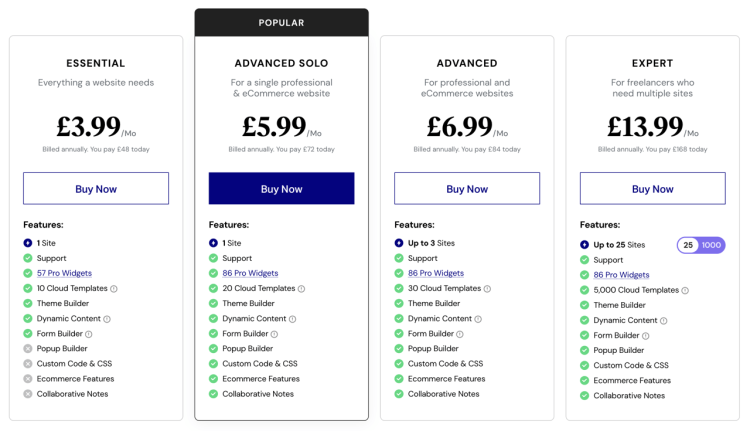
When applied thoughtfully, Elementor can also simplify long-term maintenance. Layout changes can be made visually and applied across the site from a central place, reducing reliance on repeated manual edits or frequent theme-level adjustments.
Top Tip: A lean, well-defined template system is often easier to maintain and performs more reliably than a heavily customized setup.
Final Thoughts
Elementor is a strong fit for blogging when structure, user experience, and long-term flexibility matter. It allows WordPress to remain the content engine while providing a system that keeps blog layouts intentional as a site grows.
The value of Elementor becomes clearer as blogs move beyond basic publishing. Site-wide templates, conditional layouts, and built-in engagement points help content feel purposeful rather than theme-bound.
For blogs that want more control over how content supports growth, Elementor Pro provides the tools to do so without changing how content is written or managed.
Top Tip: Elementor works best when it supports how your site evolves, not just how it looks today.
Frequently Asked Questions
Q: Is Elementor good for blogging?
A: Elementor works well for blogging when the goal is to control structure and user experience across a site, while keeping content creation within WordPress.
Q: Do bloggers need Elementor Pro?
A: Elementor Pro becomes relevant when blogs need site-wide templates, conditional layouts, or integrated engagement elements.
Q: Can Elementor be used without changing how blog posts are written?
A: Yes. Blog posts can continue to be written and managed in WordPress. Elementor focuses on layout and experience rather than publishing.
Q: Does Elementor replace a WordPress theme?
A: No. Elementor works alongside a theme, adding flexibility where theme templates are limiting.
Q: Can Elementor handle different blog layouts for different content types?
A: Yes. With Elementor Pro, templates can be applied conditionally so different types of blog content follow different layouts.
Q: Does using Elementor affect site performance?
A: Performance depends on how Elementor is used. Centralized templates and restrained complexity help keep sites efficient.